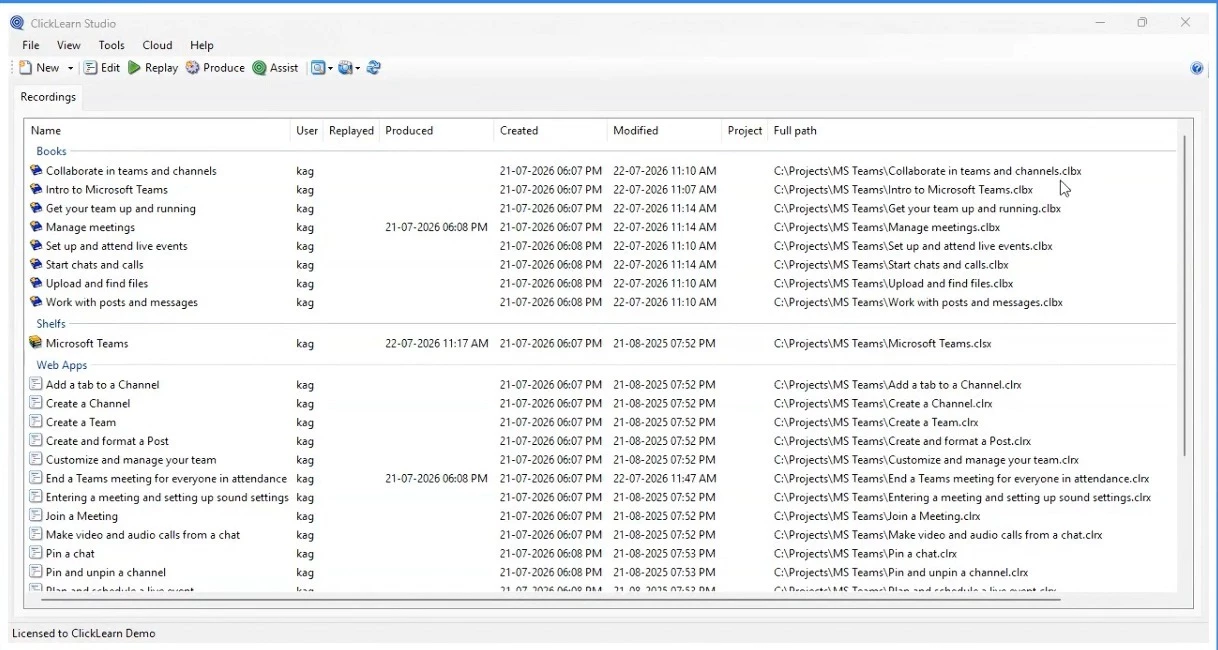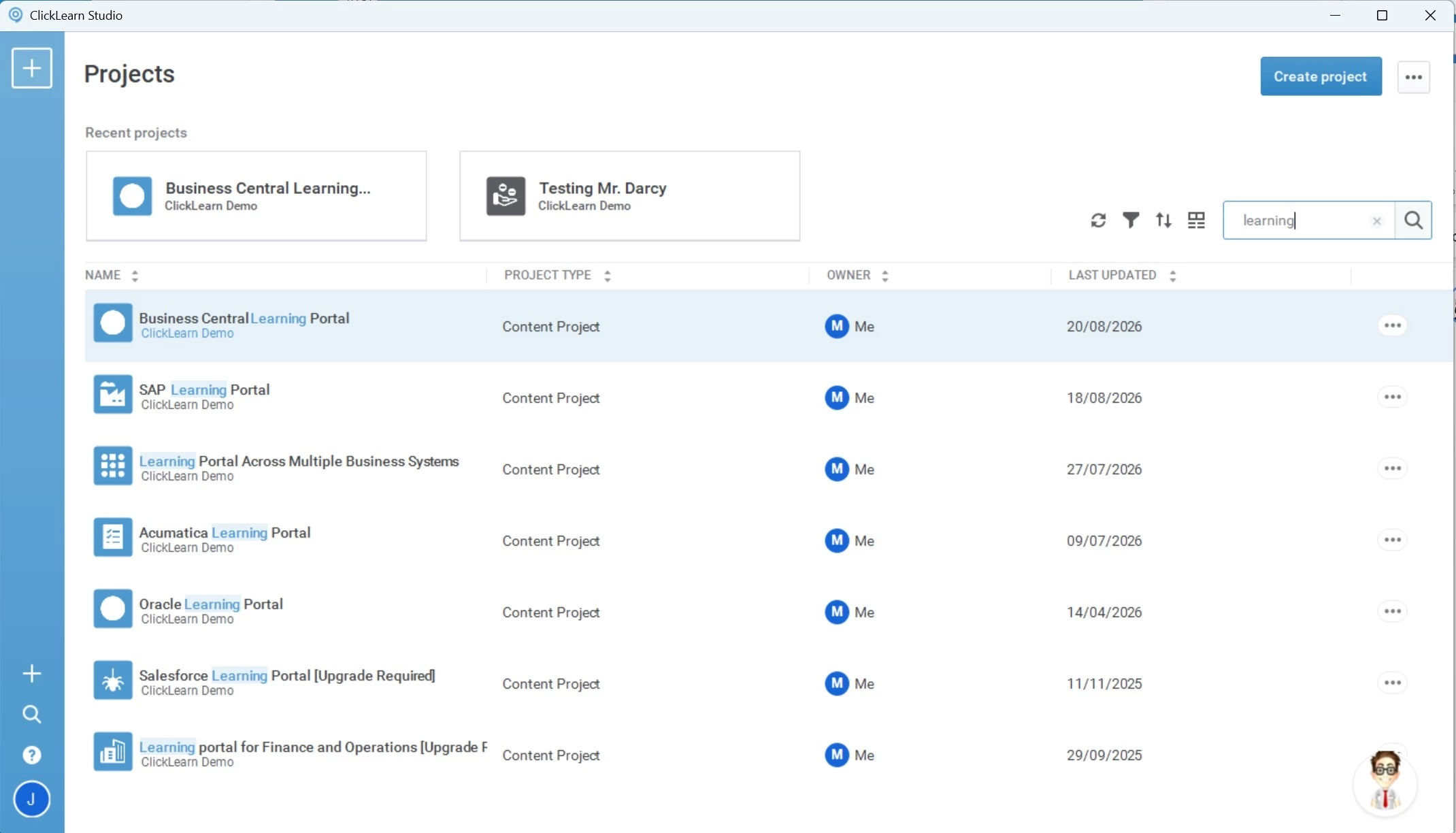
Classic → Attain

Upgrade to
ClickLearn Attain

Attain is the current version of ClickLearn, with major improvements to speed, collaboration, publishing, and analytics. This guide covers what's new, what changes, and how to make the move. Your source files are ready to bring with you.

No added cost Included in your subscription
Bring your content Source files ready to import
Join 97% Of ClickLearn customers on Attain
Aug 31, 2026 Classic end date

In this guide you'll find what's changing, what stays the same, the steps to upgrade, and answers to common questions. If you have questions along the way, reach out to support@clicklearn.com.

⚠️ Upgrade by August 31st, 2026

Complete your migration before August 31st, 2026. After this date, ClickLearn Classic will no longer be available. To ensure continued access to your content and workflows, upgrade to Attain before then.

What will no longer be available after August 31st:
The Classic Studio software
Authoring activity tracking from Classic Studio
The Classic Admin Portal (portal.clicklearn.com)
Content published from Classic to a Learning Portal (content.clicklearn.com/). Republishing from Attain will restore access to the new content portal.
OData service for content tracking Used to monitor end user activity in external system.
This upgrade is included in your existing ClickLearn subscription

The upgrade from Classic to Attain is included with your existing ClickLearn subscription, at no additional cost. Your existing source files are ready to bring with you, and we're here to help you through each step of the process.

What is ClickLearn Attain?

ClickLearn Attain is the current version of ClickLearn, rebuilt and released in 2021. It delivers the same core recording workflow you know from Classic, with a refined interface and improved collaboration, publishing, and analytics.

Authors still install Attain on their PC, and Attain supports both cloud and on-premises deployments, so you can keep the setup that suits your organisation.

🏆
Join 97% of ClickLearn customers already on Attain

Released in 2021, with five years of real-world use, continuous refinement, and extensive QA behind it. You're moving to a platform that's proven at scale, not a brand-new release.

ClickLearn Classic
  • Single-user authoring model
  • Basic publishing templates
  • Limited analytics visibility
  • Manual content management
ClickLearn Attain
  • Full team collaboration
  • Rich publishing templates
  • ClickLearn Analytics built-in
  • Project-based organisation
What's different in Attain

Attain introduces a number of changes from Classic across several areas. Here's what you'll find when you make the move.

Speed

Faster performance

Attain is significantly faster than Classic for both authoring and publishing.

🎨Publishing

Updated publishing options

Updated visual templates with granular publishing settings and full control over every output detail.

👥Collaboration

Team collaboration

Project-oriented workflows let you manage, delegate, and complete tasks across your team, from a two-person project to a 30-language portal.

📊Analytics

ClickLearn Analytics

Every component in your learning portal is trackable. Get insights on usage across your portal, virtual assistants, and videos.

🚀Deployment

Simplified publishing

Deploy a full learning portal, including tracking, search, videos, virtual assistants, and audience targeting, directly from Attain.

🎧Support

Built-in guidance

Direct access to training, documentation, and support from inside the application.

What stays the same

Attain is built on top of Classic, not a replacement that starts from scratch. Everything you've already created is ready to bring with you.

Your source files are ready to bring to Attain

All your Classic recordings will be brought across during the migration process. And your learning units need to be republished to be available.

🏢
Attain supports on-premises deployments

Attain is not a cloud-only solution. If your organisation requires an on-premises setup, ClickLearn Attain fully supports this, so you don't need to change how your infrastructure is managed in order to migrate.

⚙️
The core recording workflow you know

Recording, editing, and publishing in Attain builds directly on what you know from Classic. The interface is refined, not reinvented.

Steps to upgrade

The migration from Classic to Attain is a guided process. Here's what to expect.

1
Prepare

Locate your source files

Your Classic recordings are stored as .CLRX, .CLBX (Book) and .CLSX (Shelf) files on the computer where you ran ClickLearn Classic. These are the source files you'll import into Attain. Without them, your recordings can't be migrated.

💡 Where to look: Search your computer for *.clrx*.clbx and *.clsx. They're typically in your Documents folder or wherever you saved your Classic projects. If Classic was run on a shared or dedicated machine, check there too.
2
Download

Get access, download and install ClickLearn Attain

If you don't already have access to ClickLearn Attain, our team will send it to you. Once you have it, download and install Attain on the computer(s) where your team will be authoring. This is the same machine you'll use to import your .CLRX files in the next step.

💡 IT-managed installations: If your organisation uses MSI installs, give your IT team a heads-up now so they can prepare before the August 31st deadline.
3
Migrate

Run the migration process

In Attain, create a new project if you don't already have one (click Create Project from the home screen). Then go to Project Settings and click Import from ClickLearn Classic. Select whether you want to import Recordings or Books/Shelfs, then choose your .clrx or .clbx/.clsx files. The process is designed to be seamless, and your content comes with you intact once you republish.

Import from ClickLearn Classic dialog in Project Settings, showing the Recordings and Books/Shelfs import options
The Import from ClickLearn Classic option lives in Project Settings. Choose whether to import Recordings or Books/Shelfs.
4
Verify

Review your content in Attain and publish it

Review your learning units and content portals in Attain to confirm everything has come across correctly, then publish your content.

5
Explore

Get hands-on with Attain

Once migrated, explore the new collaboration features, publishing templates, and analytics dashboard. The Migrate to Attain workshop walks you through everything with guidance from ClickLearn trainers.

Watch: Migrate to Attain Workshop (MasterClass 2023)
This hands-on workshop was designed specifically for ClickLearn Classic users making the move to Attain. Get guided experience with the migration process, learn how to take advantage of Attain's new capabilities, and ensure a smooth transition. Watch the workshop →
Common questions
Is ClickLearn Attain cloud-only, or can we keep our on-premises setup?
Attain is not a cloud-only solution. It fully supports on-premises deployments, so if your organisation requires that setup you can migrate to Attain without changing how your infrastructure is managed.
When does ClickLearn Classic reach its end date?
ClickLearn Classic will reach its end date on August 31st, 2026. After this date it will no longer be available, so your migration to Attain must be completed before then. We recommend starting well in advance to give your team time to get comfortable with Attain before the deadline.
Is there an additional cost to upgrade to Attain?
No. The upgrade from ClickLearn Classic to ClickLearn Attain is included in your existing ClickLearn subscription. There is no additional cost to migrate.
Will my existing Classic recordings and published content be lost?
No. Your existing source files are ready to bring with you to Attain. The migration tool is designed to bring everything across intact, all you need to do is replublish once the migration is done.
What are .CLRX, .CLBX and .CLSX files and where do I find them?
.CLRX, .CLBX and .CLSX files are your ClickLearn Classic source files. Each one contains a recording and is what you'll import into Attain to migrate your content. You'll find them on the computer where you ran ClickLearn Classic. Try searching for *.clrx*.clbx*.clsx in Windows Explorer or File Explorer. They're typically saved in your Documents folder or a dedicated project folder. If Classic was installed on a shared or office machine rather than your own, check there.
How different is Attain from Classic? Will I need retraining?
The core recording and editing workflow in Attain is built directly on Classic, so you won't be starting from scratch. The interface is significantly improved, but ClickLearn is designed to guide you back to your previous speed quickly. The Migrate to Attain workshop is a great way to get up to speed fast.
What is ClickLearn Analytics™ and do I need to set it up?
ClickLearn Analytics™ is a built-in tracking and reporting dashboard that provides insights on how your users engage with your learning portal, virtual assistants, and videos. It's included with Attain and requires no separate setup, it is enabled by default when you create a project. Every component in your portal is trackable by default, unless you disable for specific projects.
Can multiple people work on the same project in Attain?
Yes, true team collaboration is one of Attain's key improvements over Classic. Attain uses a project-based model that lets you manage, delegate, and complete tasks across your whole team simultaneously, whether you're a small team or running a 30-language global portal.
Where can I get help if something goes wrong during migration?
Reach out to support@clicklearn.com and we'll help you through it.