

Question

PDF Export Formatting Issues

  • December 4, 2025
  • 3 replies
  • 13 views

I have updated the font on my portal and when I print to PDF, the font does update as it is in the portal. Any way to update or fix? 


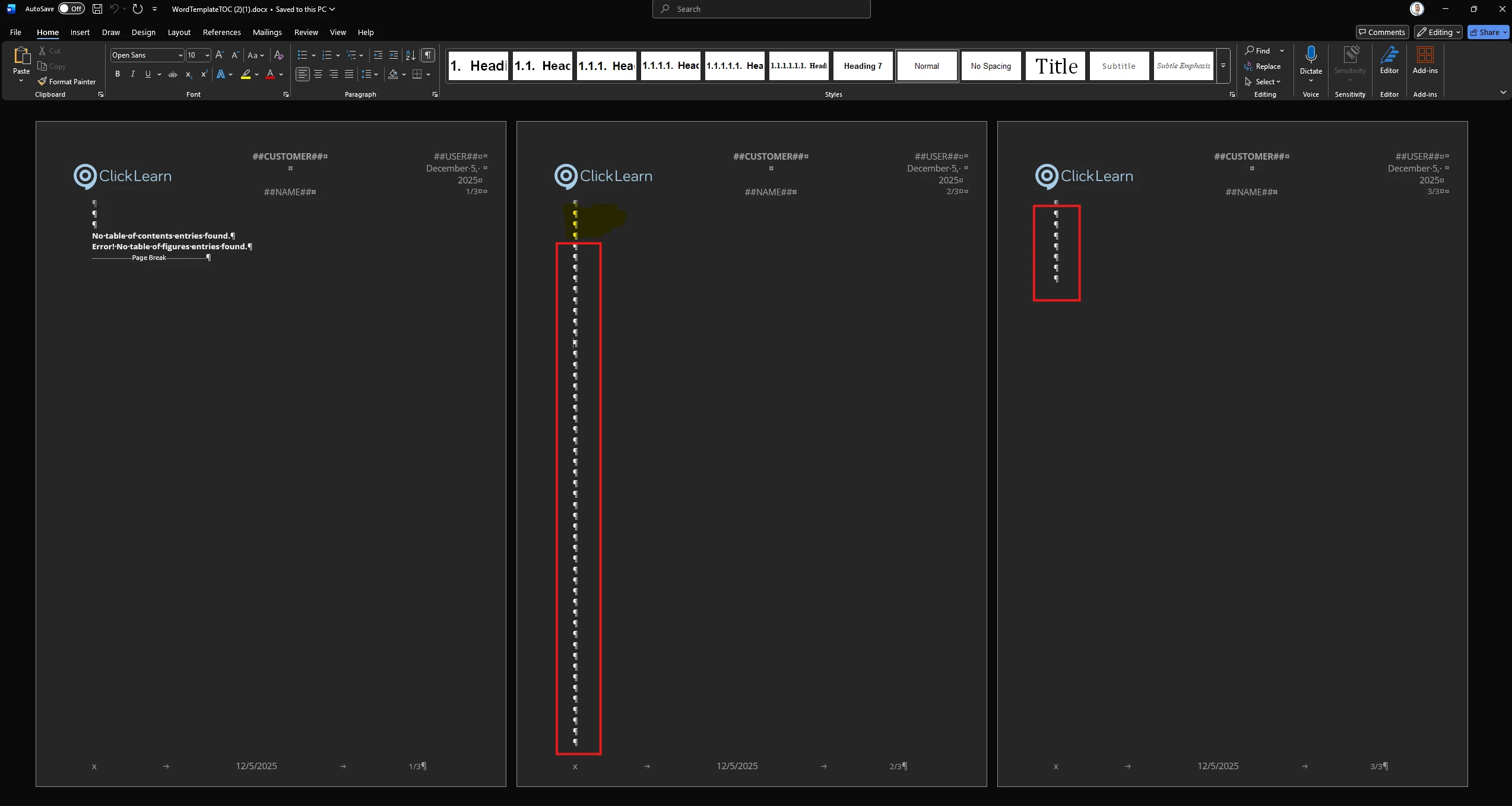
Also, when I export to pdf, my pdf prints a blank page at the end of the documentation. Any way to remove? 


Note: I am using the attached word template. Please help :) 

3 replies

Morten
Community Manager
Forum|alt.badge.img
  • Community Manager
  • December 5, 2025

Hi ​@bboone 


The yellow highlight is the content bookmark, so basically where the content is pasted.


The red highlight are just forced linebreaks - you can delete any number of those to get rid of that last page.


Regarding setting your font, please check out this video, at 3:30:


  • Author
  • Enthusiast
  • December 10, 2025

Hello! I followed the steps in the video although my version seems to be updated, and the font is still not saving. When I download a preview, the word documents still has the Arial font. Any other videos that may be of hel? 


Morten
Community Manager
Forum|alt.badge.img
  • Community Manager
  • December 10, 2025

Hi ​@bboone 


can you post your template here, or send a mail to support - then we can fix it on a remote session 😊