


We are using ClickLearn Studio to record from Dynamics 365. Our recordings have shown numbered steps previously but we have set up a new Project and that doesn’t show any numbers on the steps. What is going on. We have imported the publishing template from our main publishing project (where the step numbering works perfectly) into the new project but the numbering has vanished.

Solved
Step numbering missing
- Rising Star
Best answer by Peter Højlund Løvskov
Hi Pennyelson,
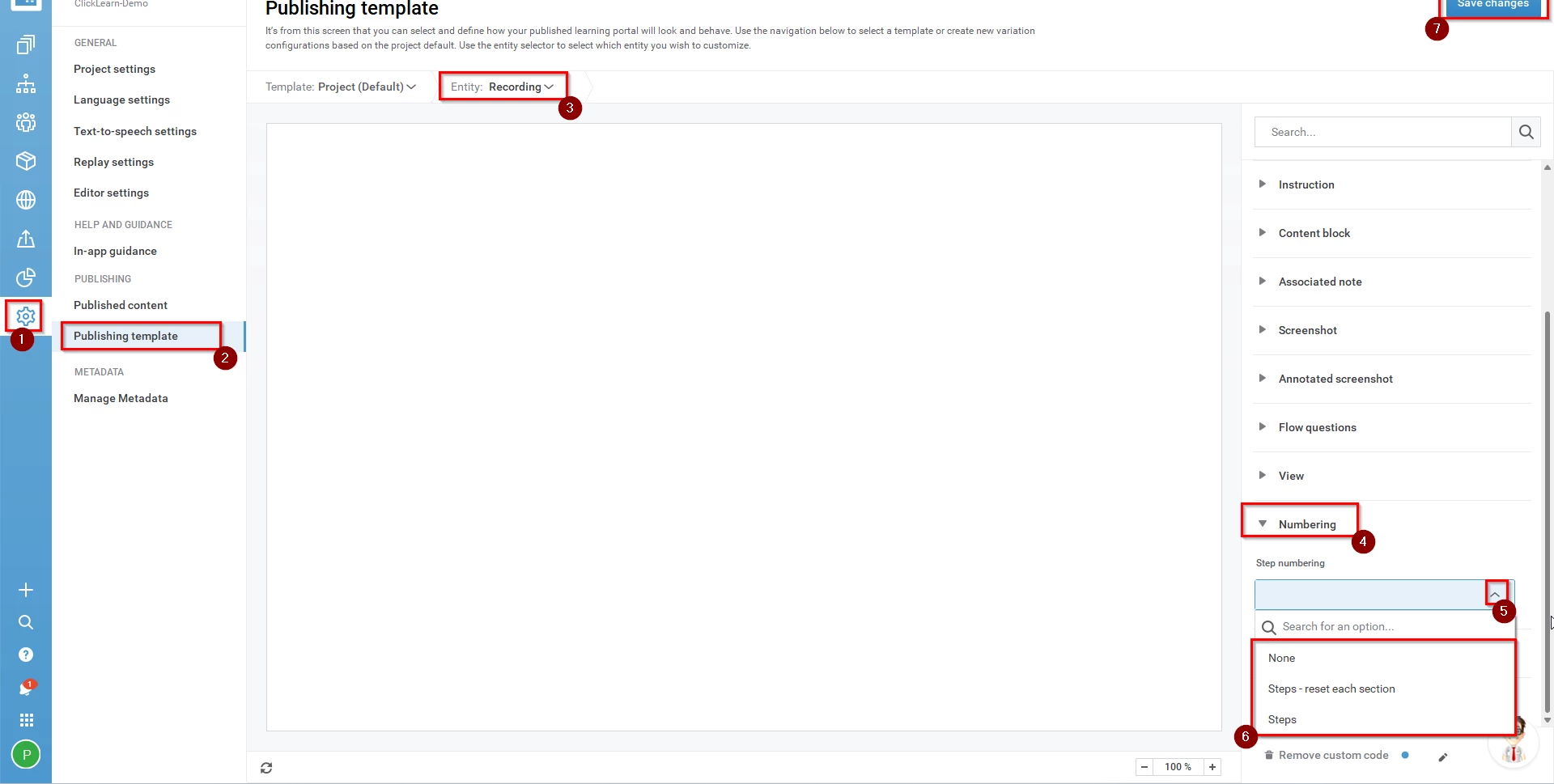
You need to to to the publishing template. Under the Entity: Recording you will find the dropdown Numbering and here you can add the sequence you want.
Remember to save changes in the top right for it to take effect.




Sign up
Already have an account? Login
NOTE: When creating a new account, please note you will by default receive e-mails regarding ClickLearn community activities. You can manage your email preferences under your personal Profile settings. ClickLearn collects personal data to enable your use and to develop and improve the community and to provide you the most useful service, as detailed in the Privacy Policy. We only accept personal accounts. Fake accounts (users engaging under fake names),or group accounts will not be accepted.
Enter your E-mail address. We'll send you an e-mail with instructions to reset your password.