


Tutorial

VIDEO: Converting your skills from Classic to Attain

  • July 5, 2021
  • 6 replies
  • 207 views

Per
Super User
Forum|alt.badge.img

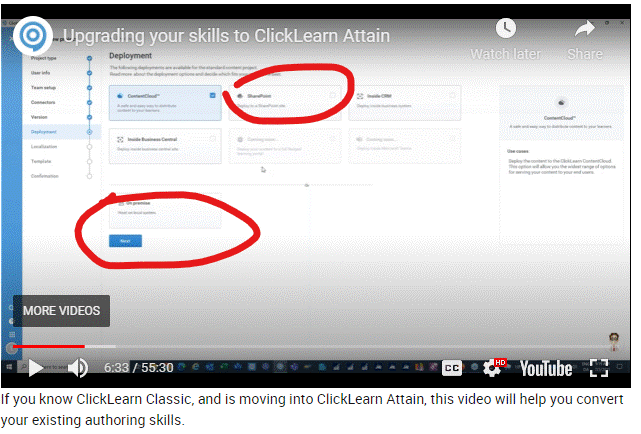
If you know ClickLearn Classic, and is moving into ClickLearn Attain, this video will help you convert your existing authoring skills.

6 replies

trice602
Rising Star
Forum|alt.badge.img+2
  • Rising Star
  • July 16, 2021

Lars - question:  I didn’t follow this step on deployment (I will continue watching) but we are publishing to a local folder (the produced content) and then I am dragging into a webserver.  What option does that fall under?  Am I above or below the line in this screenshot?  Thank you for your time!  Tom  :grinning:


trice602
Rising Star
Forum|alt.badge.img+2
  • Rising Star
  • July 16, 2021

Yes!!! 👇🏽👇🏽👇🏽👇🏽👇🏽


trice602
Rising Star
Forum|alt.badge.img+2
  • Rising Star
  • July 16, 2021

Wow!  Great 55 minutes!  I am motivated to login into Attain Monday morning and start building this out! :gear::gear::gear::gear::gear:


Lars Heinrich
Training Manager
Forum|alt.badge.img
  • Training Manager
  • August 9, 2021

Hi Tom,

That is absolutely a very good question! And thanks for the feedback! 😊

Unless you have a very high level of security and you need everything to be behind your own firewall, I would recommend that you publish your content to the cloud and then share the content URL with your end users. Alternatively, you can download the produced content and then drag it to your own webserver. In other words I would keep it “above the line” to have all cloud services available.

Thank you for asking!

BR Lars


trice602
Rising Star
Forum|alt.badge.img+2
  • Rising Star
  • August 9, 2021

Thanks Lars -- I have successfully published locally and enjoying the new version! :grin:


Morten
Community Manager
Forum|alt.badge.img
  • Community Manager
  • December 19, 2024

check out this video on the import processs.