

Solved

Show Me Video

  • Jan 15, 2024 1:45 AM UTC
  • 5 replies
  • 139 views

Forum|alt.badge.img

We would like to share only the Show Me videos with some of our end-users. Is there a way to do this either with a direct link or by templating.

Thanks Penny

Best answer by pennyelson

Thanks @Christine and @Morten  for this wealth of information. In the end we found an old article and used the url for the recording with &t=showme added at the end and this seems to be working.

Thanks so much - Penny

View original

5 replies

Christine
Training Manager
Forum|alt.badge.img
  • Training Manager
  • Jan 17, 2024 4:47 PM UTC

Hi Penny! 

Here is a link to an inquiry that is very similar to yours.  Take a look at this response and let me know if you would like to meet for any further clarification. 


Morten
Community Manager
Forum|alt.badge.img
  • Community Manager
  • Jan 18, 2024 8:56 AM UTC

We would like to share only the Show Me videos with some of our end-users. Is there a way to do this either with a direct link or by templating.

Thanks Penny

Hi Penny,


I can also recommend this video for a few additional options:

https://community.clicklearn.com/morten%2Ds%2Dcorner%2D74/video%2Doptions%2D1081?postid=2773#post2773


Forum|alt.badge.img
  • Author
  • Rising Star
  • Answer
  • Jan 18, 2024 9:40 PM UTC

Thanks @Christine and @Morten  for this wealth of information. In the end we found an old article and used the url for the recording with &t=showme added at the end and this seems to be working.

Thanks so much - Penny


Forum|alt.badge.img
  • Author
  • Rising Star
  • Apr 5, 2024 5:16 AM UTC

Hi 

we had set up and started to use adding &t=showme to the url which was working perfectly.

This now no longer works - and the when you click the icon from the learning portal you are taken straight back the learning portal home screen.

Please can you make this work again.

Thanks Penny


Morten
Community Manager
Forum|alt.badge.img
  • Community Manager
  • Apr 5, 2024 9:19 AM UTC

Hi @pennyelson 


it works fine here - perhaps you need to clear your browser cache or try a different browser.


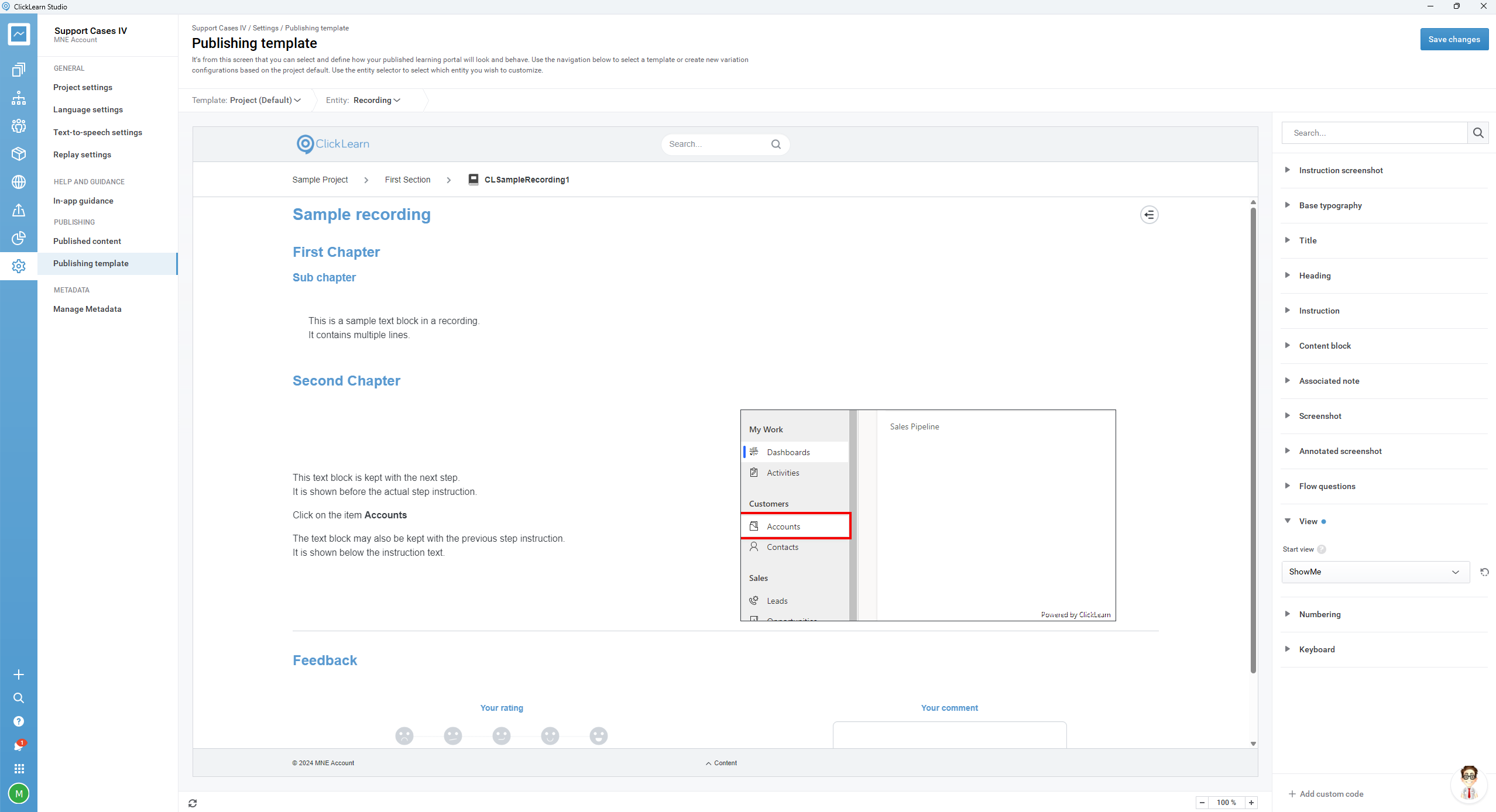
Or what you can do instead is to enforce it via the template here: