



Launch ShowMe with URL

  • July 13, 2020
  • 3 replies
  • 212 views

Michael Foster
Rising Star
Forum|alt.badge.img+2

Did you know that you can build and share a URL to automatically launch a user directly into a Showme video?

Just add: &t=showme to the end of an existing recording URL !

Example: https://help.clicklearn.com/ClickLearn%20Learning%20Portal/ClickLearn%20Learning%20Portal.htm?b=Product%20Documentation&r=Introduction&t=showme

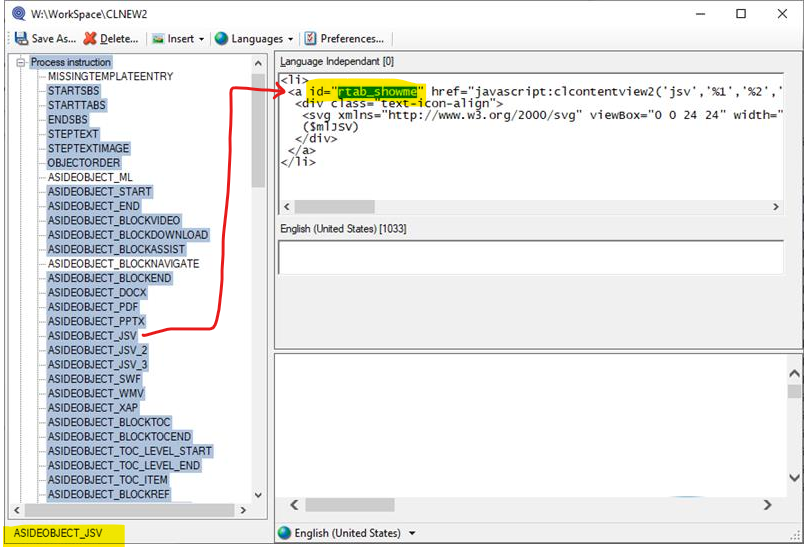
If this doesn’t work in your environement and if you are comfortable working with your template, add the following to ASIDEOBJECT_JSV. Otherwise request from ClickLearn Support.

 

3 replies

Forum|alt.badge.img
  • Explorer
  • October 14, 2020

Thanks, Michael. This was just what I needed, and it is working perfectly!

Only one issue that I would like to work around…

When I close the video player window, focus goes to the ClickLearn Learning Portal topic. I’d like closing the video to close out the whole portal.

Is there some setting that will open the video in its own page rather than from the portal, so when I close it, the portal closes as well?

I am using this functionality to link to videos from a separate learning page, so having the portal appear in his context could be confusing. If it makes it easier to picture, here is my link (2.5 min video)

Watch a training video on setting up and adding contacts


trice602
Rising Star
Forum|alt.badge.img+2
  • Rising Star
  • July 14, 2021

Thank you!  We have some customer facing training and wanted to strip almost everything and launch directly into “show me”.  Works like a charm :grinning:


Forum|alt.badge.img
  • Rising Star
  • April 5, 2024

Hi all,

this was previously working on ClickLearn Attain but seems to have stopped working has this been changed?

Thanks Penny